WeatherXM

The technology

LoRaWAN, explained

A weather station sends small readings, often, from places without infrastructure. LoRaWAN was designed for exactly that: tiny packets, very long range, and batteries that last seasons instead of days.

Layer 1 · the radio

LoRa

A chirp spread-spectrum modulation that trades data rate for reach. Receivers can decode LoRa signals even below the noise floor, so a transmitter using milliwatts is heard by gateways kilometers away on licence-free sub-GHz bands. H2 uses the Semtech LR1110 radio.

Layer 2 · the network

LoRaWAN

An open protocol maintained by the LoRa Alliance. A station never pairs with one gateway: every gateway in range hears the same uplink and forwards it to a network server, which removes duplicates and routes the packet to its application. More gateways means more redundancy, with no configuration on the station.

Security · built in

Encrypted twice

Each packet carries two layers of AES-128. A network session key lets the network server confirm the packet is authentic and unaltered. A separate application session key encrypts the payload so only the application can read it. Gateways relay what they cannot decrypt.

LoRaWAN 1.0.2 Class A · station-initiated uplinks OTAA join Regional plans · EU868 · US915 · AU915 BLE for setup & diagnostics

Where LoRaWAN fits among WeatherXM connectivity options

Wi-Fi LoRaWAN Cellular LTE LoRa mesh
Reaches Your router, usually within one building A gateway 2–10 km away Wherever the carrier has coverage A local console, 100+ km hop by hop through other mesh nodes
Needs on site Wi-Fi and a powered indoor console Nothing beyond the station Compatible cellular signal Other mesh nodes
Best for Homes, offices, schools Farms, campuses, rural land Remote commercial sites Off-grid sites and station clusters
WeatherXM station D1 Wi-Fi → H2 LoRaWAN Pulse LTE → D2 Mesh →

Signal path

From sensor to API in four hops

The same LoRaWAN architecture applies whether your station reports through Helium, The Things Network or a private gateway. Only the network server and destination change.

  1. 01

    Measure

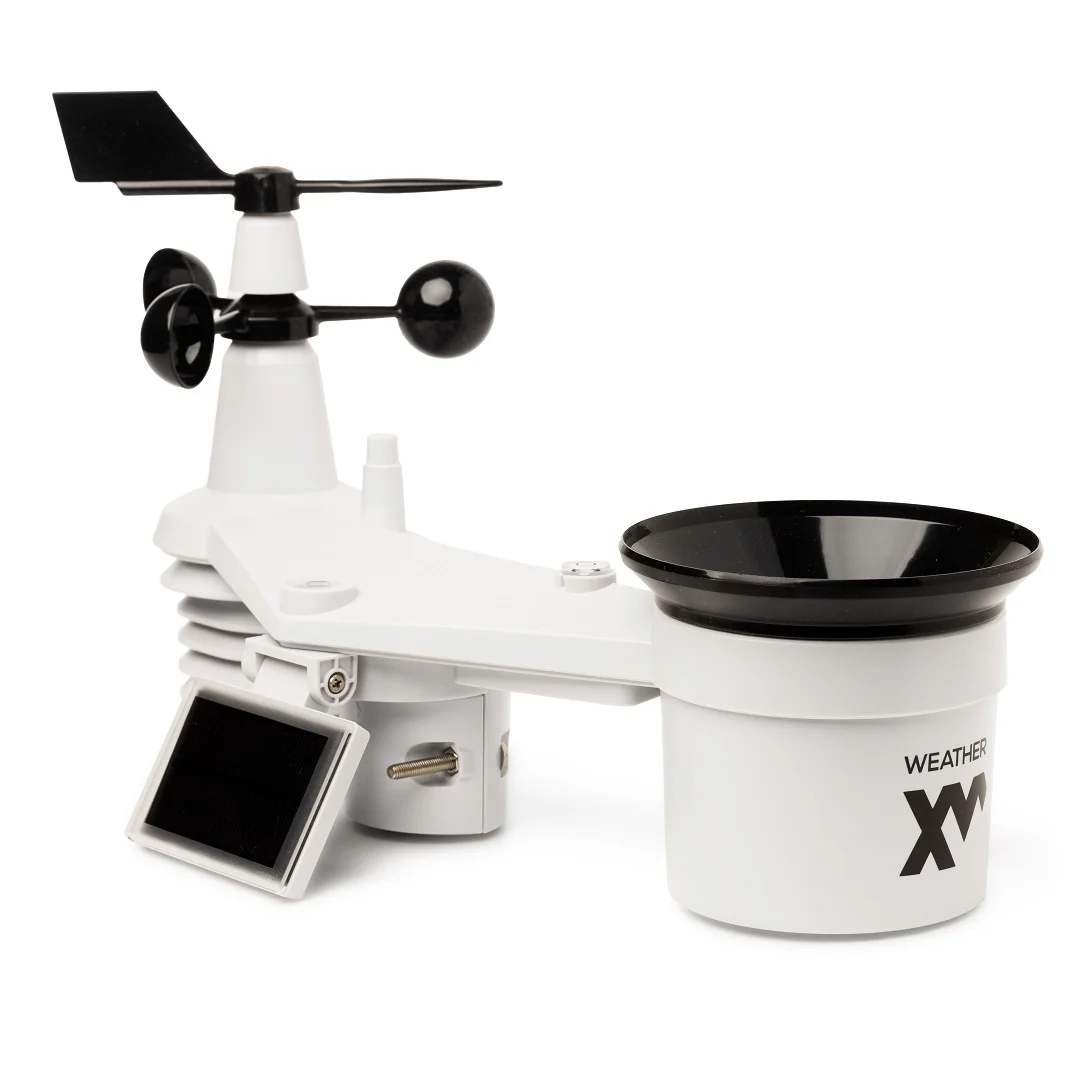
    Eight sensors in one outdoor unit sample temperature, humidity, pressure, wind, rain, light and UV, powered by the sun.

  2. 02

    Broadcast

    The station packs the readings into a compact, encrypted LoRaWAN uplink and transmits it. No pairing and no local router.

  3. 03

    Route

    Any gateway in range picks it up and forwards it to the network server, which keeps one copy and verifies it.

  4. 04

    Deliver

    Network Edition data is quality-checked by WeatherXM and served in the app, Explorer and Pro API. Open Edition data goes wherever you route it.

Deployment planning

Choose your LoRaWAN network

Three ways to get H2 observations off site. The network you pick decides the edition you need.

Helium logo
Network Edition

Helium IoT Network

A decentralized public LoRaWAN network of community-deployed hotspots. Instead of subscriptions, packet traffic is paid in Data Credits: a fixed-price, non-transferable unit.

You do
Claim the station in the WeatherXM app. The frequency plan is chosen from your location.
Traffic cost
Pre-onboarded on Helium. Data Credits are covered by WeatherXM.
Best when
Hotspots already cover your area and you want to join the WeatherXM Network.
Check Helium coverage ↗
Open Edition

The Things Network

A global community LoRaWAN network built on The Things Stack. The community tier is free to use under a fair-use policy that caps daily airtime per device.

You do
Register the station with the DevEUI, JoinEUI and AppKey on its label (OTAA), then add the payload decoder.
Traffic cost
Community tier is free, or use a commercial Things Stack plan.
Best when
Local TTN gateways exist and you want data in your own integration (MQTT, webhooks).
Open Edition

Your own gateway

Mount an off-the-shelf LoRaWAN gateway on a building with internet access and run the network server yourself, for example with open-source ChirpStack.

You do
Install the gateway as high as practical, then register stations on your network server.
Traffic cost
None per packet. You own the hardware and the data path end to end.
Best when
A farm, campus or estate needs guaranteed coverage and full control.
chirpstack.io ↗

Range

What decides 2 km versus 10 km

LoRa links are limited less by distance than by what sits between the station and the gateway. The radio path needs a clear, football-shaped corridor, the Fresnel zone, not just a thin line of sight.

  • ↑

    Gateway height

    The largest single factor. A rooftop or mast gateway reaches much farther than one at ground level.

  • ⌒

    Terrain and line of sight

    Hills block the signal. Flat, open land gives the best results.

  • ▦

    Buildings and vegetation

    Dense foliage and walls absorb sub-GHz energy, especially when wet.

  • 2m

    Station mounting

    Mount H2 on a pole at least 2 m high, clear of obstacles. That also improves wind and temperature readings.

A station on a pole links to a rooftop gateway several kilometers away. The Fresnel zone between them must stay clear of hills and trees. H2 · 2 m pole Rooftop gateway Fresnel zone · keep clear typically 2–10 km
Before ordering, check the Helium coverage map or TTN Mapper for your site.

Hardware editions

Same station. Two ways to connect it.

Identical sensors, build and radio range. The edition sets which LoRaWAN network the station joins and where its data goes.

Helium · WeatherXM Network

H2 Network Edition

$189

Lower-priced edition for stations contributing observations under WeatherXM Network rules. Pre-onboarded on Helium, with Data Credits covered by WeatherXM. Reward eligibility depends on the applicable Network rules and contribution quality.

  • ✓ Pre-onboarded on the Helium IoT Network
  • ✓ Helium Data Credits covered by WeatherXM
  • ✓ Claim and diagnose over BLE in the WeatherXM app
  • ✓ Network reward eligibility for qualifying contributions
Buy Network Edition →
TTN · ChirpStack · private LNS

H2 Open Edition

$239

For independent operation on compatible third-party or private LoRaWAN infrastructure. Customer-controlled credentials, and observations go to the application stack your deployment needs.

  • ✓ Own DevEUI, JoinEUI and AppKey for OTAA
  • ✓ Works with The Things Stack, ChirpStack and private LNS
  • ✓ Route data via MQTT, webhooks or your own integration
  • ✓ No WeatherXM Network participation commitment

Engineering

Technical specifications

Full documentation ↗

Temperature

−40 to +80°C

±0.5 °C

Humidity

1–99% RH

±3 % RH

Pressure

540–1100hPa

±5 hPa

Wind speed

0–50m/s

±0.5 m/s below 5 m/s

Wind direction

0–360°

±8°

Rain rate

0–450mm/h

±7 %

Light

0–200klux

Illuminance

UV index

0–16UVI

±10 %

Radio Semtech LR1110 · LoRaWAN 1.0.2 · Class A · OTAA
Frequency plans Region-specific sub-GHz ISM plans, for example EU868, US915 and AU915
Range to gateway Typically 2–10 km, depending on terrain, obstacles and gateway height
Power Integrated solar panel with 3× AA backup, or 6× AA with the external battery pack. 1.5 V non-rechargeable cells; lithium recommended for sub-zero sites.
Configuration Bluetooth Low Energy for claiming, frequency plan and diagnostics
Size & weight 44 × 17 × 27 cm · 2 kg

In the box

  • • H2 all-in-one station with solar panel and antenna
  • • External battery pack
  • • Metal zip ties for pole mounting

You'll also need

  • • AA batteries, 1.5 V non-rechargeable
  • • Metal pole, 30–40 mm diameter, at least 2 m tall
  • • Tools and fixings to secure the pole

Rechargeable batteries can damage the station.

Questions

H2 and LoRaWAN, answered

Do I need Wi-Fi or a power outlet at the station?

No. H2 runs on its solar panel with AA batteries as backup, and sends observations over LoRaWAN radio. The only infrastructure it needs is a LoRaWAN gateway within range, which can be a public Helium hotspot, a The Things Network gateway, or a gateway you install yourself.

How do I know whether my site has LoRaWAN coverage?

Check the Helium coverage map for the Network Edition, or TTN Mapper for The Things Network. Coverage maps are indicative: terrain, trees and the height of the nearest gateway matter. If coverage is marginal or missing, one gateway on a building with internet access can cover a farm or campus.

Who pays for Helium network traffic?

Helium charges for packets in Data Credits. For the H2 Network Edition, the station is pre-onboarded on Helium and WeatherXM covers the Data Credits. You do not need a Helium account.

Can gateway or hotspot operators read my weather data?

No. LoRaWAN encrypts every payload with an AES-128 application session key that only the application server holds. Gateways forward packets they cannot decrypt, and a separate network session key lets the network server verify that each packet is authentic.

Which edition should I buy for The Things Network or ChirpStack?

The Open Edition. It ships with its own LoRaWAN credentials (DevEUI, JoinEUI and AppKey) so you can register it on The Things Stack, ChirpStack or any compatible network server. The Network Edition is configured for the WeatherXM Network on Helium.

What if there is no LoRaWAN coverage and no internet at the site?

Two WeatherXM options fit off-grid sites. D2 Mesh stations relay observations through other mesh nodes over a multi-hop LoRa mesh until they reach a local console, covering 100+ km of terrain no single radio link could, with no public network involved. For a single isolated site, WeatherXM H2-LEO is in development with Lacuna Space to send H2 observations over low-Earth-orbit satellites; it is not shipping yet.

Put ground truth where the cables don't reach.

Check coverage, pick your edition, and mount H2 on a pole. The network does the rest.