WeatherXM

The technology

LoRa point-to-point, explained

The outdoor station never touches your Wi-Fi. It sends its readings over a private LoRa radio link to the indoor gateway, and the gateway handles everything else.

Topology

One station, one gateway

Point-to-point means the station talks only to its own paired WG1200. There is no LoRaWAN network server, no third-party gateway and no network subscription between the sensor and your home. The gateway can be set to listen for its saved station, or pair locally.

Why LoRa, not Wi-Fi

Through walls, on sunlight

LoRa uses chirp spread-spectrum on sub-GHz bands (EU868, US915, AS923), which passes exterior walls far better than 2.4 GHz Wi-Fi and needs a fraction of the energy. The station runs on its solar panel with AA backup and sends a packet roughly every 20 seconds.

Trust · at the gateway

Secured on arrival

The WG1200 carries an ATECC608 secure element and GPS. It cryptographically protects each observation and its location before forwarding, so data leaving your home can be verified as coming from your station.

Three ways WeatherXM uses LoRa

Same radio family, different topology for different sites.

LoRa P2P LoRaWAN LoRa mesh
Topology Station ↔ its own gateway Station → any gateway → network server Stations relay through other mesh nodes to reach the console
Distance Up to ~1 km line of sight Typically 2–10 km to a gateway 100+ km, extended hop by hop
Needs on site Wi-Fi and USB power for the gateway LoRaWAN coverage in range Other mesh nodes
Station D1 Wi-Fi H2 LoRaWAN → D2 Mesh →

Signal path

One radio in, three ways out

The WG1200 receives the station over LoRa, then serves the same observations to the cloud, to your local network and to the mesh at the same time.

  1. 01

    Measure

    The solar-powered outdoor unit samples temperature, humidity, pressure, wind, rain and light.

  2. 02

    Transmit

    About every 20 seconds it sends a LoRa packet straight to its paired WG1200 indoors.

  3. 03

    Display & secure

    The gateway decodes it, shows live conditions on its 4-inch screen and protects it with its secure element.

  4. 04

    Share

    Observations go to the cloud over Wi-Fi every minute, to your LAN on request, and to the mesh as telemetry.

WG1200 gateway · both editions

Local-first by design

Every D1 gateway, Network or Open Edition, works on your own network and on the mesh. The cloud is one destination, not a dependency for local use.

Local web UI & HTTP REST API

The gateway serves a web interface and a REST API over HTTP on your LAN. Read live observations straight from the device, with no internet round trip and no cloud account in the loop.

Home Assistant Alexa Node-RED BMS / SCADA microSD logging
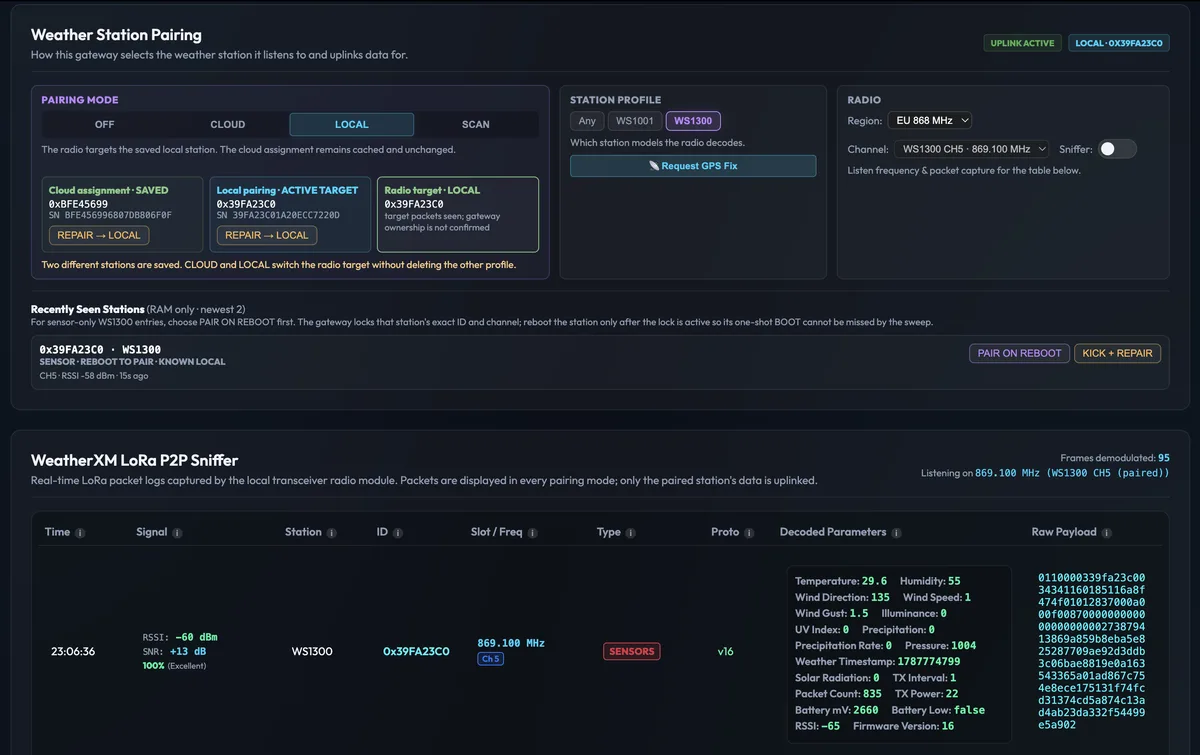
WG1200 local web interface showing station pairing, radio settings and a live LoRa P2P packet log with decoded weather parameters
WG1200 local web UI: station pairing, radio settings and the live LoRa P2P packet log.

Meshtastic & MeshCore telemetry

The gateway can act as a Meshtastic or MeshCore environmental sensor, sharing full weather from your station with nearby mesh nodes. Already running a home node? D1 puts real wind, rain and pressure on your mesh.

The gateway requires USB power.

Cloud when you want it

Network Edition forwards over Wi-Fi every minute to the WeatherXM app, Explorer and Pro API. Open Edition follows an independent backend path for private deployments.

Where local integration pays off

Smart home

Automations on real conditions

Close awnings on wind, pause irrigation after rain, tune heating to the outdoor temperature at your own address.

Facilities

Building management

Feed on-site weather into BMS and HVAC control over the LAN, independent of internet availability.

Agriculture

Greenhouses & nurseries

Drive vents, shading and irrigation controllers from the station, with microSD logs as a local record.

Communities

Mesh weather feeds

Share live conditions with Meshtastic or MeshCore users nearby, even when the internet is down.

Installation

Where to put each part

  • 2m

    Station outdoors, in the open

    On a metal pole at least 2 m high, away from walls and trees that distort wind and temperature.

  • ↔

    Gateway within LoRa range

    Up to about 1 km with line of sight. A window facing the station helps; concrete, metal and coated glass reduce range.

  • 5V

    Gateway on Wi-Fi and USB power

    Needs a 2.4 GHz Wi-Fi signal and a USB power supply. The USB-C cable is in the box; the power adapter is not.

The outdoor station on a pole in the yard sends LoRa packets to the WG1200 gateway inside the house near a window. The gateway connects to the home Wi-Fi router. Station · 2 m pole LoRa P2P · up to ~1 km LOS WG1200 Router 2.4 GHz Wi-Fi

Hardware editions

Same hardware. Your choice of commitment.

Identical station and gateway. Both editions include the local web UI, LAN REST API and Meshtastic/MeshCore telemetry.

WeatherXM Network

D1 Network Edition

$199

Lower-priced edition for stations contributing observations under WeatherXM Network rules. Reward eligibility depends on the applicable Network rules and contribution quality.

  • ✓ WeatherXM app, Explorer and Pro API
  • ✓ Network reward eligibility for qualifying contributions
  • ✓ Local web UI and LAN HTTP REST API
  • ✓ Meshtastic & MeshCore telemetry
Buy Network Edition →
Independent · local first

D1 Open Edition

$299

For private and business deployments without a WeatherXM participation commitment, with the model-specific independent backend and firmware path.

  • ✓ No WeatherXM Network participation commitment
  • ✓ Independent backend / firmware path where supported
  • ✓ Local web UI and LAN HTTP REST API
  • ✓ Meshtastic & MeshCore telemetry

Engineering

Technical specifications

Full documentation ↗

Temperature

−40 to +60°C

±0.2 °C

Humidity

10–99% RH

±5 % RH

Pressure

300–1100hPa

Barometric

Wind speed

0–50m/s

±1 m/s below 5 m/s

Wind direction

0–359°

Wind vane

Rain rate

0–300mm/h

±10 %

Light

0–200klux

±15 %

Station uplink

~20s

LoRa P2P to gateway

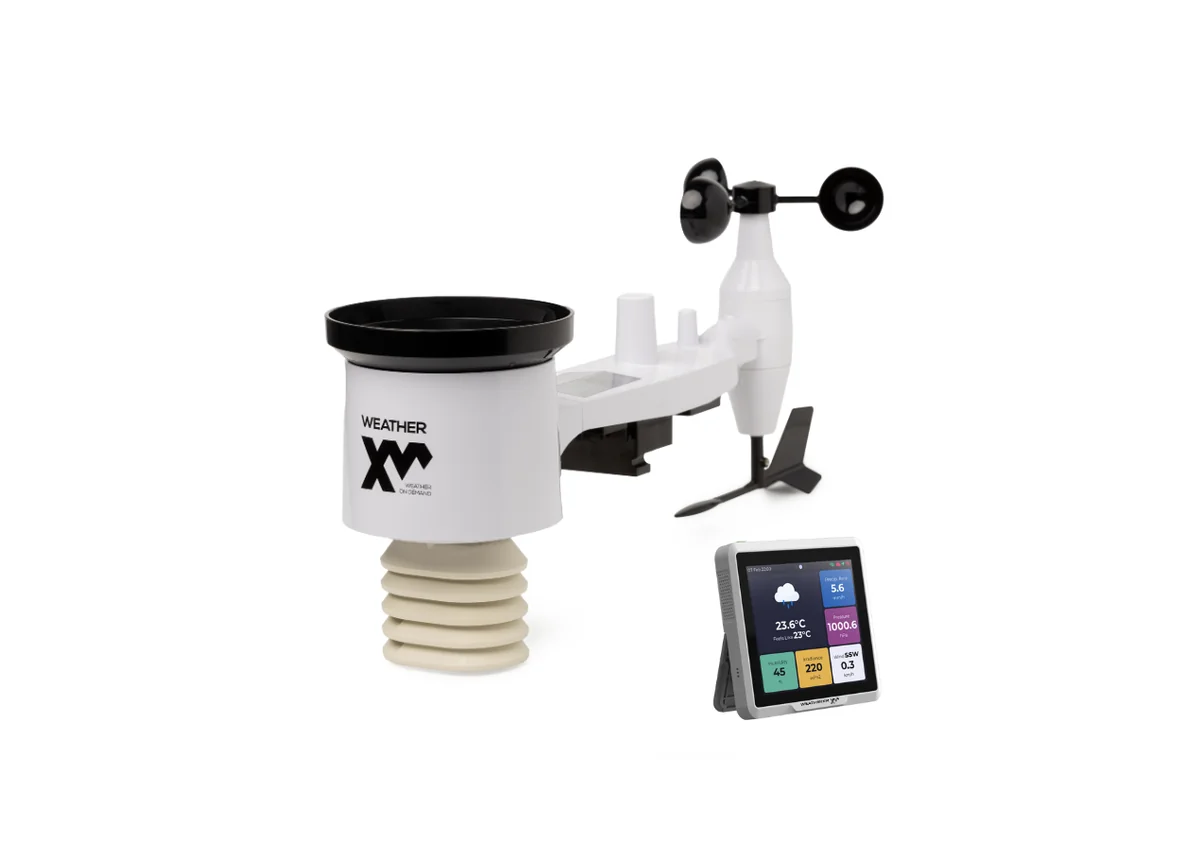
Components WS1001 outdoor station + WG1200 indoor gateway
Station link LoRa point-to-point, sub-GHz (EU868, US915, AS923) · up to ~1 km line of sight · packet about every 20 s
Station power Integrated solar panel with 2× AA backup; external battery pack included for extra cells. 1.5 V non-rechargeable.
Gateway 4″ capacitive touchscreen · 2.4 GHz Wi-Fi · USB-C power · ATECC608 secure element · GPS · microSD logging
Interfaces Cloud over Wi-Fi (every minute) · local web UI and HTTP REST API on LAN · Meshtastic / MeshCore environmental telemetry · BLE
Size & weight 44 × 17 × 27 cm · 2 kg

In the box

  • • WS1001 station with wind cups, wind vane and solar panel
  • • WG1200 gateway with USB-C cable
  • • External battery pack
  • • Mounting plate, U-bolts, nuts, wrench, screwdriver, zip ties, bird spikes

You'll also need

  • • AA batteries, 1.5 V non-rechargeable
  • • USB power supply for the gateway
  • • Metal pole, about 50 mm diameter, at least 2 m tall

Rechargeable batteries can damage the station.

Questions

D1, answered

Why doesn’t the outdoor station connect to Wi-Fi directly?

Wi-Fi is power-hungry and struggles through exterior walls. The D1 station instead sends compact LoRa packets to the indoor WG1200 gateway, which runs on USB power next to your router and handles Wi-Fi. That lets the station run on a small solar panel with AA batteries as backup.

Is D1 a LoRaWAN station like H2?

No. D1 uses LoRa point-to-point: the station talks only to its own paired WG1200 gateway, with no LoRaWAN network server or third-party gateway involved. H2 uses LoRaWAN and can reach public or private gateways kilometers away.

Can I use D1 with Home Assistant without the cloud?

Yes. The WG1200 gateway serves a local web UI and an HTTP REST API on your LAN in both editions, so Home Assistant, Node-RED or your own software can read observations directly from the gateway.

What does the Meshtastic and MeshCore support do?

The WG1200 gateway can act as a Meshtastic or MeshCore environmental sensor, sharing the station’s weather telemetry with nearby mesh nodes. Both editions support it. The gateway needs USB power.

What is the difference between the Network and Open Editions?

The hardware is identical. The Network Edition is lower-priced because the station contributes observations under WeatherXM Network rules. The Open Edition is for independent, private deployments without a WeatherXM participation commitment. Both include the local LAN API and mesh telemetry.

How far can the station be from the gateway?

Up to about 1 km with clear line of sight. Walls, especially concrete, metal and coated glass, reduce that, so place the gateway near a window facing the station.

Ground truth for your home, your building, your mesh.

Mount the station, plug in the gateway, and read your weather wherever you need it.